Filter User
In the field marked with red circle enter the name of the user you want and click on Search button marked with red. You will get the desired user in the below list.
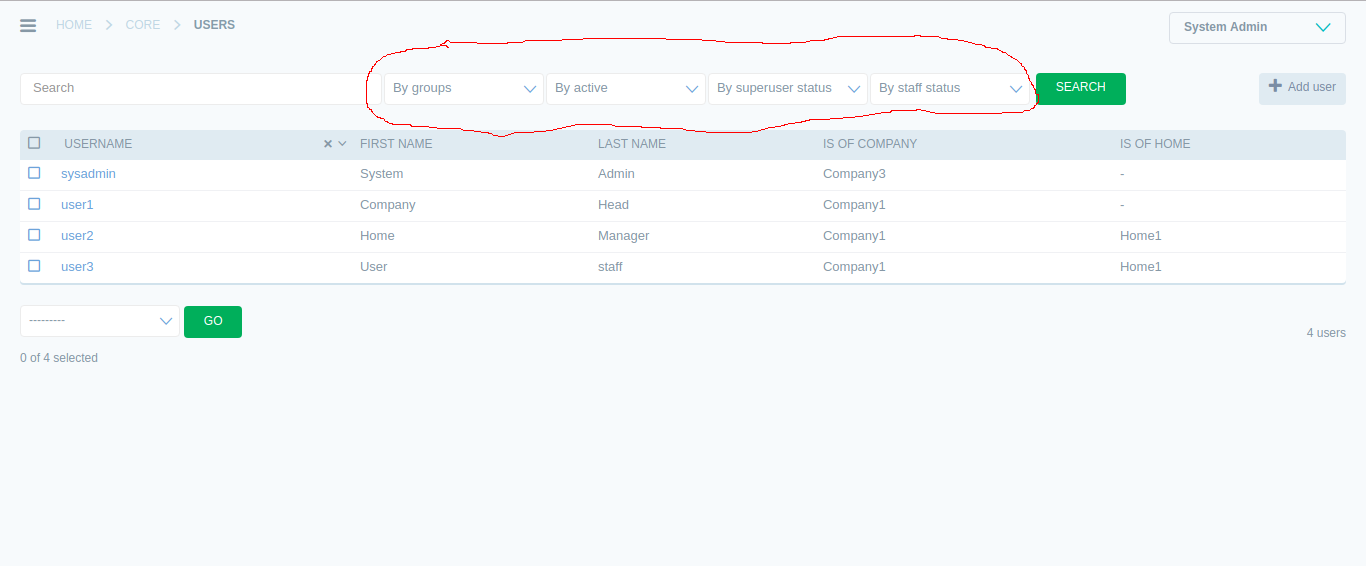
- Filtering option contains :
- Filter by Group
- It contains the menu in the drop down and you can filter based on the category. * System Admin * Company Head * Home Head * StaffSelecting any of the above shows the user of only the list of users of that particular category only.
- By active
- Sort users based on the activeness.
- Yes
- No
- By superuser status
- Sort user based on Super user status. If you want to sort user with super user status then select Yes.
- By staff status
- If you want to sort user that are Staff only then select Yes from the list.
- Toggle sorting
Click on the down-arrow icon to toggle the particular sorted field.

Click on cross icon if you want to cancel toggling the fields.